
AI for teachers: test papers, lesson plans and slides for every lesson
Choose the curriculum framework, build the test blueprint, let AI fill in the content, then review each warning yourself before publishing.
For K-12 teachers, heads of subject groups and school leadership.
You always see what the app is doing
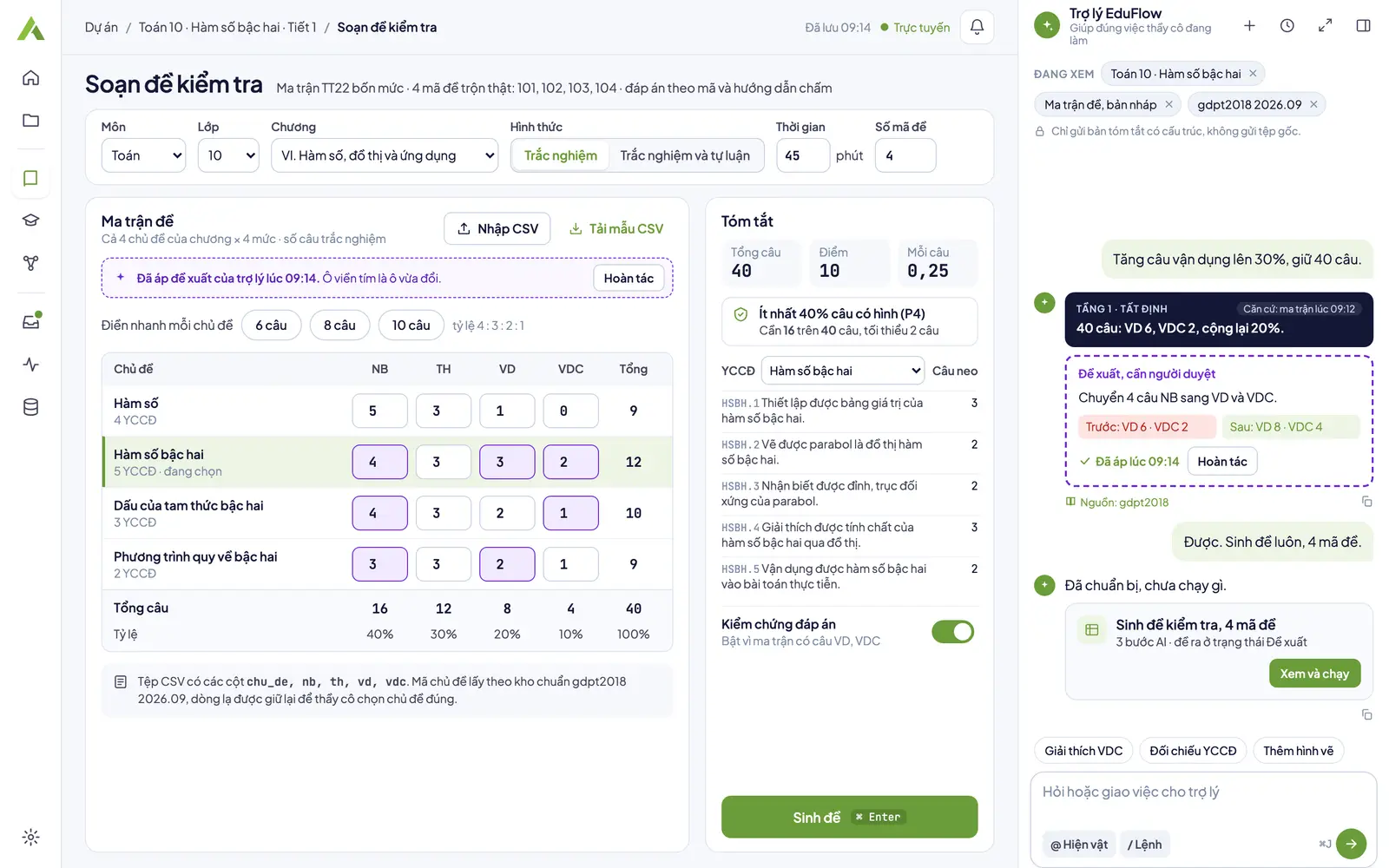
Test paper setup
Test blueprint, standards framework and cost estimate on a single screen.
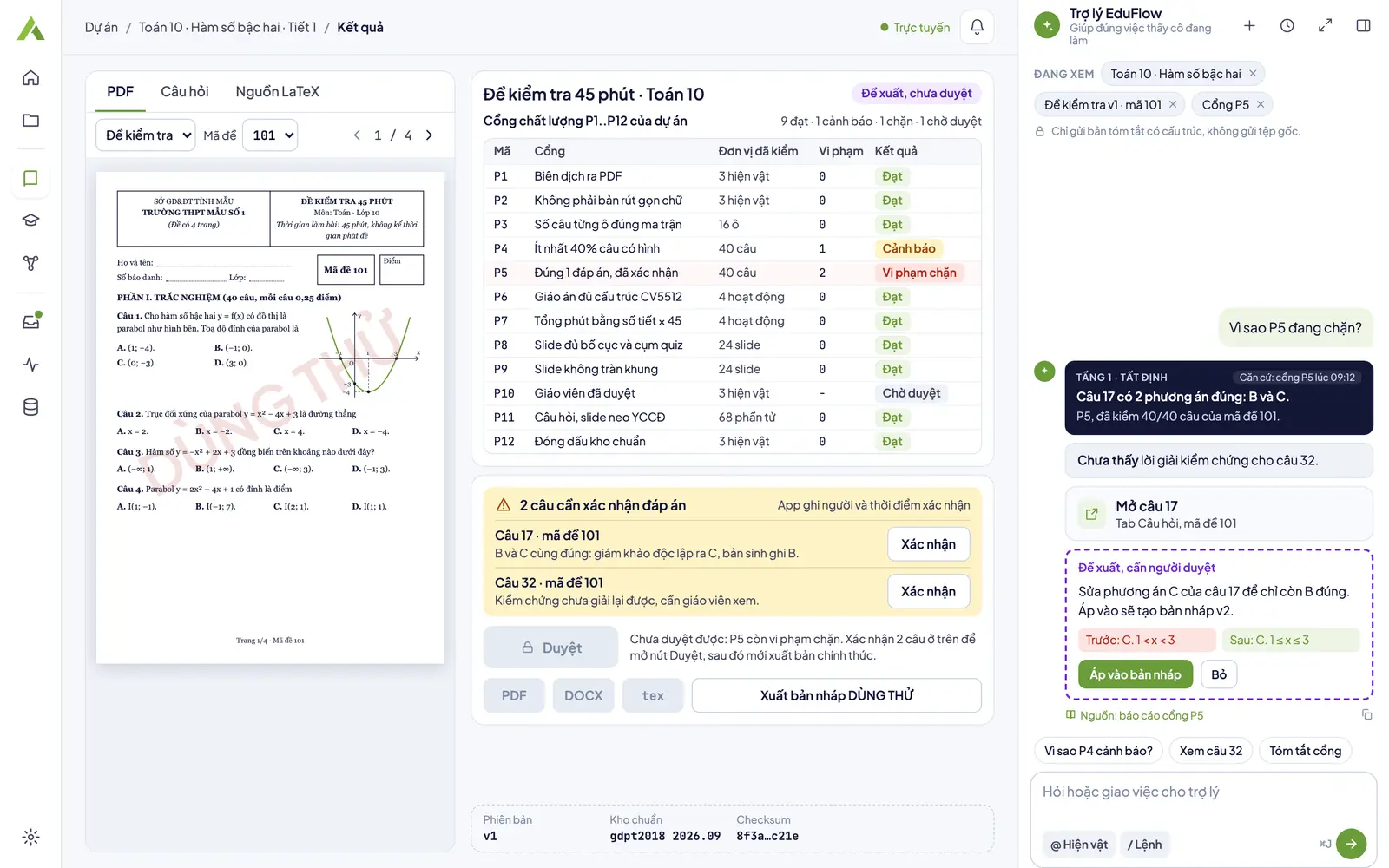
Results and quality gates
The gate table of a test has 8 gates from P1..P12, each reporting how many units it checked; answer warnings must be confirmed item by item.
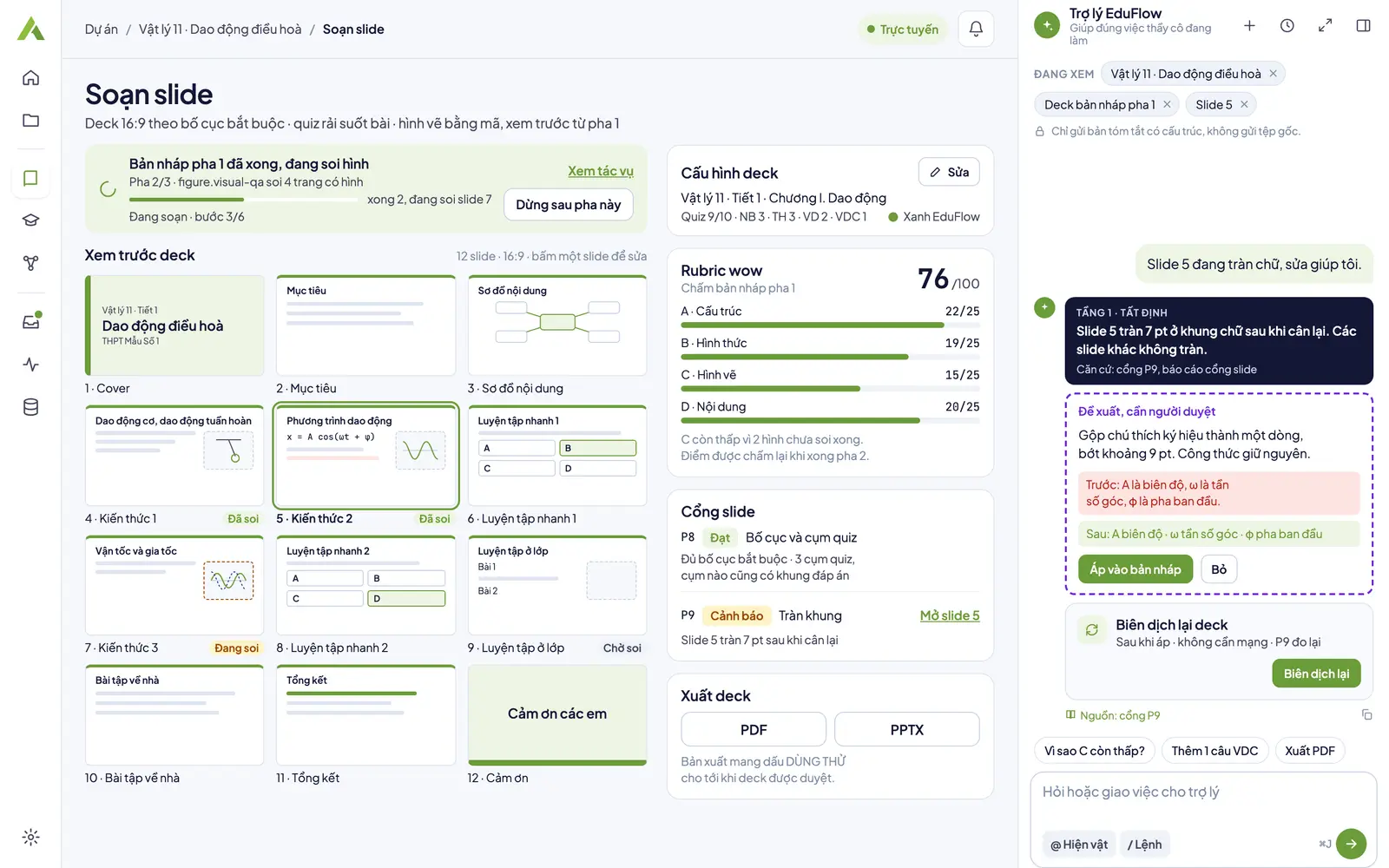
Slide studio
Preview the deck, edit each slide and read the slide gates before exporting PDF or PPTX.
Figures in the screenshots are sample data for illustration.
From test blueprint to a full test set with appendices
Test papers from a four-level test blueprint
A test blueprint of recall, understanding, application and advanced application by topic; the question count per level is the source of truth.
Multiple test versions, deterministic shuffling
Each test version shuffles question and option order with a fixed seed and comes with a specification table, answer key and marking guide.
Independent answer check
When the matrix has application or advanced application items, a separate AI pass solves the test again. Any question whose answer changes becomes a warning, and you confirm each one.
Lesson plans per Official Letter 5512 (CV5512)
Period-by-period lesson plans with an implementation table, teacher notes and your school's header.
Slides with quizzes
Decks follow the required layout, with quizzes spread through the lesson and a preview from the very first step.
Full sets and slide themes
One full-set run creates the lesson plan and the slides of the same lesson; the slides come with eight built-in themes.
12 gates, P1..P12
The gate table covers compilation, the question count in each blueprint cell, the share of questions with figures, confirmed answers, lesson plan and slide structure, and the standards library stamp. In this version the compilation gates P1 and P2 do not apply yet and the figure gate P4 is off.
A gate that checked 0 units shows Gate error, never Pass.
Topic pages for this level
- AI test generatorSet a four-level matrix, let AI write the items, run quality gates, approve, then export the test and answer key.
- Shuffle test versionsReorder items and options into several versions, each with its own correct key, exported to Word or PDF.
- AI lesson plan generatorAI drafts a lesson plan in the Official Letter 5512 structure with four activities; you approve, then export Word or PDF.
- AI slide generatorAI writes a 16:9 deck with quizzes in the lesson; you preview, check the gates, approve, then export PDF or PPTX.
Step by step in the app
- Create a test from a blueprintCreate a test in EduFlow step by step: set the subject and duration, build a four-level matrix, let AI write items, read the quality gates, then approve.
- Export a test in several versionsChoose up to 24 test versions, turn question and answer shuffling on or off, read the export checks, then export DOCX or PDF; the key is a separate file.
- Write a lesson plan (Official Letter 5512)Write an Official Letter 5512 lesson plan in EduFlow: pick the lesson, let AI draft the four activities, read gate warnings, edit, approve, export DOCX or PDF.
- Create lesson slides with quizzesCreate 16:9 lesson slides in EduFlow: pick Slide or the full set and a look, let AI write content and quizzes, preview, read gates, approve, export PDF or PPTX.
Frequently asked questions
What can EduFlow prepare for K-12 teachers?
Tests built from a four-level matrix, shuffled into several versions with the test specification, answer key and marking guide; Official Letter 5512 lesson plans; lesson slides with quizzes. The app builds the structure, AI fills in the content, and you review and click Approve.
Which question types can a test have?
Two forms exist today: multiple choice, and a combined multiple-choice and essay form, where essays are scored and come with a marking guide. True or false, short-answer and essay questions with scored sub-parts are on the EduFlow roadmap.
How many versions can one test have?
Up to 24 test versions. Questions and options are shuffled with a fixed key, so printing again gives the same versions; the answer key and marking guide are separate files.
Can I trust answer keys written by AI?
When the matrix has application or advanced application items, a second AI pass solves the test again. Any item whose answer changes becomes a warning, and you confirm each item before approving.
Does AI publish a test or lesson plan on its own?
No. AI content carries the Suggestion label until you click Approve, quality gates have no skip button, and only people approve. At the K-12 level, Approve is the last step. Exports carry the TRIAL (DÙNG THỬ) watermark while the test is not approved, a blocking violation remains, a trial key is in use, the key type of this computer could not be checked or the item is a sample.
Prepare your next lesson with EduFlow
Download the app and choose Request a trial on the first screen.