
Skip to content
EduFlow
Desktop app for macOS and Windows

AI software for teachers: test papers, lesson plans and lesson slides

Today EduFlow writes test papers, lesson plans and slides for K-12 teachers. Lecturers and quality assurance offices load documents and ask the assistant; course syllabi and curriculum review are on the roadmap. The app builds the standard structure, AI fills in the content, and you review.

EduFlow runs on macOS and Windows computers.

  • Your data stays on your computer
  • Costs shown before anything runs
  • You review before anything is exported
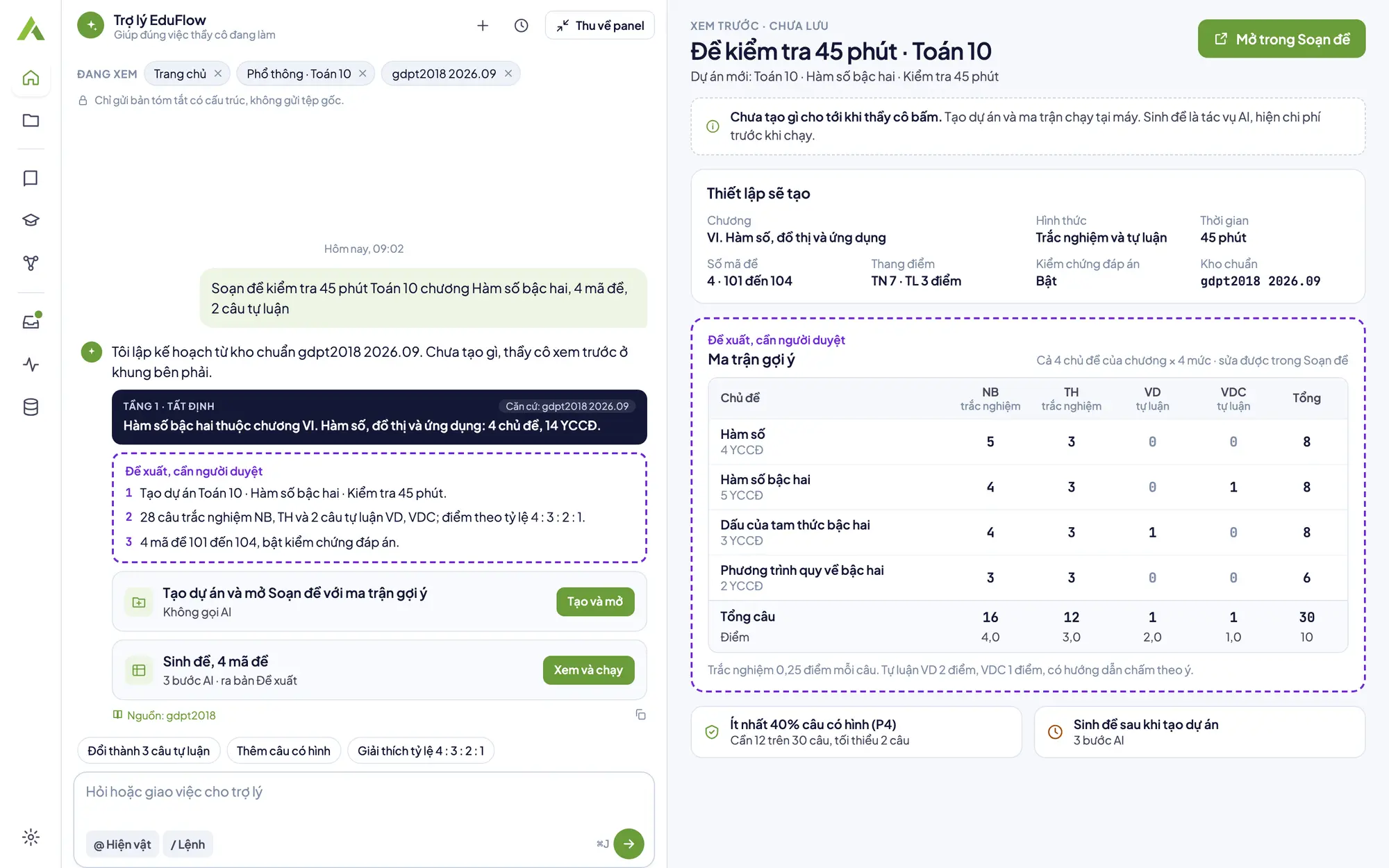
EduFlow home screen: the chat column with the assistant and a preview of the test paper about to be created
  • 3levels in one app; Courses and Programs have projects, documents and the assistant today
  • 24test versions per test, at most
  • 0VND for anything that runs on your computer
  • macOS and Windows: Apple Silicon, Intel, x64
Three levels, one app

A workspace for every role, one way of working

K-12 teachers, lecturers and the Quality Assurance Office share one app. K-12 has the full set of writing tools; Courses and Programs have projects, documents and the assistant today, and the rest is on the roadmap.

K-12

  • Test papers from a four-level test blueprint, multiple test versions
  • Lesson plans per Official Letter 5512 (CV5512)
  • Lecture slides with quizzes
Explore the K-12 level

University courses

  • A Course project, lecture materials read on your computer
  • Ask the assistant about your documents, with Source chips
  • CLOs, weekly plans, syllabus: roadmap
Explore the University courses level

Degree program

  • A Program project, degree program records added
  • Ask the assistant about the program's documents
  • Digital twin, review at a date: roadmap
Explore the Degree program level
AI assistant always at hand

Ask, request edits and hand over tasks right on the screen you are working on

The assistant understands the project and artifact you have open, answers in three tiers of conclusions and offers action cards, so the app does the work when you click.

  • Helps with what you are working onThe “Viewing” chips show each item that is sent. The assistant only receives a structured summary, never the original files; remove a chip and that item is not sent.
  • Local actions cost nothing, AI tasks quote firstAction cards like opening a screen, creating a project or switching AI off run directly on your computer. AI tasks always show a cost range before they run.
  • Clear suggestions, you decideThe assistant's suggestions carry the label “Suggestion, needs human review”. They are text to read; to change something, you edit it on the writing screen, and an approved version stays as it is.
  • Never approves on your behalfThe Approve button lives in the Export step of the main screen. Ask the assistant to approve and it shows you the screen to do it on yourself.
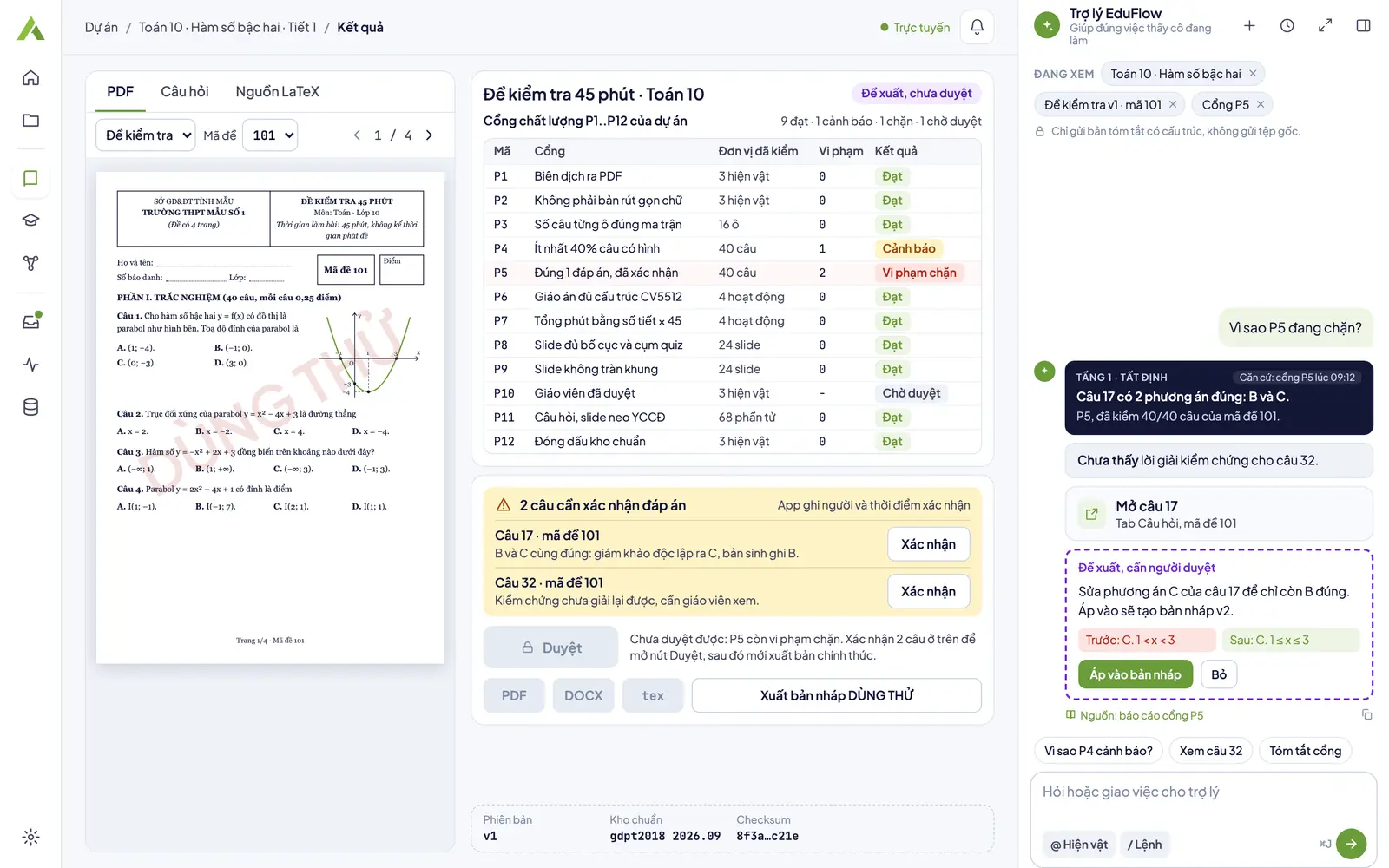
Learn about the assistant
Design preview, not a screenshot of the app: the test results screen with the gate table and the assistant panel explaining gate P5
How EduFlow works

Five steps, with a person deciding at the last one

Each project keeps its steps on your computer so you can reopen it and carry on.

  1. 01

    Set up

    Choose the subject, grade, topic and curriculum framework. You can start with a single sentence to the assistant.

  2. 02

    AI fills in structured content

    The app builds a fixed structure; AI only fills in the content within it.

  3. 03

    Quality gates check

    Each gate prints how many units it checked. A gate that checked 0 units counts as an error and never reports a pass.

  4. 04

    You review

    AI content carries the Suggestion label until you approve it. At K-12, Approve is the last step; editing afterwards creates a new draft.

  5. 05

    Export files

    Tests and lesson plans export to DOCX or PDF, slides to PDF or PPTX; exporting runs on your computer and costs nothing.

Transparency and safety

The machine suggests, people decide

Your data stays on your computer

Projects, artifacts and chat history stay on your computer. The server only relays content to the model and records token counts; it never stores content.

Three tiers of conclusions, never mixed

The deterministic tier states facts with their basis. The comparative tier says “not found yet”. The suggestion tier always needs human review.

Zero units checked is not a clean result

The gates that run print how many units they checked; a gate that checked nothing counts as an error.

An approved version stays as it is

After approval, editing a test or lesson plan creates a new draft; the approved version is never edited directly.

Works offline

Setting up, editing and exporting files keep working offline. Only the AI parts need a connection.

Transparent costs

Every AI task shows an estimated cost before it runs and the actual cost after it runs.

Usage-based cost

Pay for the AI you use; what runs on your computer is free

EduFlow charges by the AI tokens used. Quality gates, exporting test versions, compiling and reading documents run on your computer at no cost. Each key has a monthly budget and warns you at 80% usage.

See how pricing works
Download

Download EduFlow for your computer

Version 1.0.74, released 23 Oct 2026.

Windows

Windows 10 22H2 or later, 64-bit
EduFlow-Setup-1.0.74.exe116 MB · v1.0.74 · 23 Oct 2026
DownloadInstallation guide

macOS · Apple Silicon

Mac with an Apple M chip
EduFlow-1.0.74-arm64.zip136 MB · v1.0.74 · 23 Oct 2026
DownloadInstallation guide

macOS · Intel

Mac with an Intel chip
EduFlow-1.0.74-x64.zip139 MB · v1.0.74 · 23 Oct 2026
DownloadInstallation guide
Not sure which chip your Mac has? Open the Apple menu, choose About This Mac and read the Chip line (Apple Silicon) or the Processor line (Intel).
Questions and answers

Frequently asked questions

What is a license key and where do I get one?

A key is issued by your school or Agentra and starts with EDU-. If you do not have one, send a trial request right in the app, or contact Agentra to get a key.

How do I try it?

Download and open EduFlow, choose Request a trial on the first screen and fill in the form. A trial key works on 1 computer, with a trial budget and an expiry date; each computer can receive only one trial key.

Do I need an Internet connection?

Yes, to activate, to run AI tasks and to ask the assistant. Setting up, editing and exporting files keep working offline.

Where is my data stored, and what does the assistant send?

Projects and artifacts stay on your computer. The assistant only sends a structured summary of the open screen; when you ask about documents, only the passages in the chips you keep go with the question. The server does not store content.

How am I charged?

By the AI tokens used, with a monthly budget per key. What runs on your computer is free. Details are on the Pricing page; schools can contact Agentra for a quote.

How many computers can one key be used on?

As many as the maximum number of devices on the key. When all slots are used, ask an administrator to revoke an old device through Agentra, then activate on the new computer.

Can a school turn off AI for a project?

Yes. Switch AI off in the project details and the app sends no AI calls for that project, including the assistant; everything that runs on your computer keeps working as usual.

How do I update to a new version?

The current version does not update itself in the app. When you need a newer one, go to the Download page, get the latest installer and install it as you did the first time; your projects live in the app's own data folder, apart from the install folder.

What is EduFlow?

EduFlow is AI software for teachers and lecturers: matrix-based tests, lesson plans and slides, document loading and an AI assistant, with human review. EduFlow is a desktop app by Agentra JSC for macOS and Windows. Today the app has the full set of writing tools for K-12; for Courses and Programs it has projects, documents and the assistant, while syllabus writing and curriculum review are on the roadmap.

How is EduFlow different from ChatGPT?

ChatGPT is a general-purpose chat assistant, good for ideas and quick drafts. EduFlow builds the standard structure of each piece of preparation: blueprint and specification, test versions, 5512 lesson plans, quality gates and your review step, with your data on your computer.

EduFlow vs ChatGPT

Bring EduFlow to your subject group, department or quality assurance office

Download the app to try it, or contact Agentra for a quote based on the size of your school.