
How do ChatGPT and EduFlow differ?
ChatGPT is a general-purpose chat assistant: one open chat window for any topic, where you write a request in plain words, read the result and keep asking. The conversation is open-ended: you decide where it goes and you check the result.
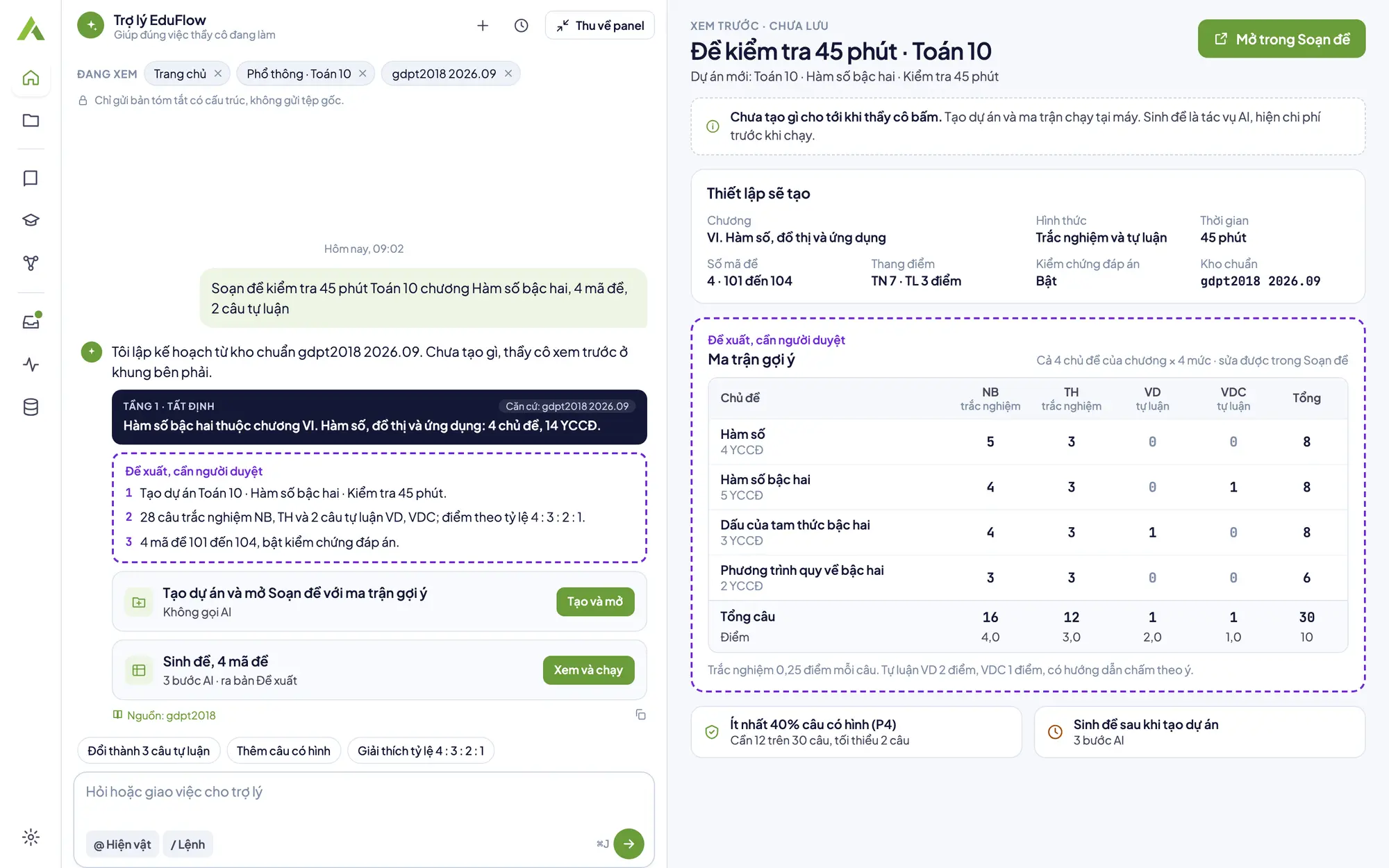
EduFlow is the opposite: not an open chat but an app installed on your computer for a specific set of school-teacher jobs: building tests from a blueprint, writing lesson plans in the Official Letter 5512 structure, and making lecture slides. Each job goes through fixed steps: set up, let AI write, the machine checks the gates, you edit and approve, then export.
So the right question is not which tool is better, but whether the job in front of you needs flexibility or a process. The sections below take each case in turn, with sample prompts you can use right away in ChatGPT or any chat tool.
ChatGPT and EduFlow, criterion by criterion
| Criterion | ChatGPT | EduFlow |
|---|---|---|
| Holding to each blueprint cell | You state the item count per cell in the prompt and recount the result. | AI writes items to the count of each cell of the four-level blueprint. Gate P3 checks each cell; if it is off, the app regenerates up to 2 times. |
| Test specification | You ask for a table and adjust its layout yourself. | A Blueprint and specification document lists each item by level, topic and learning requirement. |
| Re-checking answers | You ask for the items to be solved again in the chat and compare. | When the blueprint has Application or High application items, an independent AI pass solves them again; answer warnings need your confirmation item by item. |
| Several test versions | You ask for a reordering and check each version's answers yourself. | Up to 24 versions (101 to 124), deterministic shuffling of items and options, and the app checks each version's answers before saving. |
| Lesson plan structure (Official Letter 5512) | You paste the structure into the prompt and check that every section is present. | A fixed structure with four activities in a 45-minute lesson; gate P6 checks the sections and gate P7 checks the total minutes. |
| Reviewer | You check the content and record the approval yourself. | Tests, lesson plans and slides stay Proposed until you press Approve. Unapproved work can still be exported, but the export carries a DÙNG THỬ (trial) watermark. |
| Source data and cost | You decide what to paste into the chat, and read the tool's own terms and prices. | Source documents are read on your machine; only matching passages, shown as chips you can remove, are sent with a question. A cost estimate box appears before every AI job and Cancel costs nothing. Turn AI off for a project and nothing from it leaves the machine. |
Table checked on 15 Oct 2026.
When ChatGPT is already enough
Much lesson preparation needs no process, and a general-purpose chat assistant is usually enough. If your job is one of these, you may not need EduFlow.
- Finding ideas: Opening scenarios, worked examples, ways to explain a hard concept.
- Single questions: A few quick questions for the end of a lesson, with no need to match a blueprint.
- Quick drafts: A rough draft you will keep editing in your own word processor, with no fixed structure.
When you need EduFlow
EduFlow is worth using when you must hand in a standard-conforming product that someone will review: a test with a blueprint, a lesson plan in the right structure, several test versions, or slides with a quiz.
- A test that follows a blueprint: Item counts per cell, the specification and answer re-checks are in the process, not something you count by hand. AI test generator.
- Several test versions: Shuffled items and options in up to 24 versions, each with its own key, and a reprint gives exactly the version you printed. Shuffle test versions.
- A lesson plan in a frame: Four activities, minutes and learning requirements from the GDPT 2018 curriculum frame built into the app. AI lesson plan generator.
- A reviewer and a record: Warnings need confirming line by line, Approve is what makes it final, and the approval is saved on the version.
ChatGPT prompts for lesson plans and tests: four ready-to-use samples
These prompts are neutral and work in ChatGPT or any other chat tool. Replace the text in square brackets with your own, and do not paste student names or personal data. The result always needs you to read and edit it.
- Lesson plan: Write a lesson plan for [subject], grade [grade], lesson [title], 45 minutes, in the Official Letter 5512 structure with four activities: Opening, Forming new knowledge, Practice, Application. For each activity give the minutes, objectives, content, product and how it is run.
- Opening scenarios: Suggest 5 opening scenarios for the lesson [title] for grade [grade], each no longer than three sentences, tied to students' everyday life and ending with a question that leads into the lesson.
- Multiple-choice items: Write 8 multiple-choice items with four options on [topic]: 3 recall, 3 comprehension, 2 application. Each item has exactly one correct answer and a short explanation; wrong options must be plausible and not repeat each other.
- Feedback on a lesson plan: Here is my lesson plan: [paste]. Point out where there is no concrete learning product or the way the activity is run is vague, and suggest how to fix it. Do not rewrite the whole lesson.
Using both: ChatGPT for ideas, EduFlow for a standard-conforming result
The two tools complement each other. A simple way to work is to find ideas wherever you are comfortable, then bring the jobs that need a process into EduFlow.
- Find ideas and rough drafts in the chat tool you already use. Use the sample prompts above for opening ideas, examples and draft items. Do not paste student names or personal data.
- Build a test from a blueprint in EduFlow. Set up a four-level blueprint, let AI write items for each cell, read the gate table and approve. If you need several versions, export them straight from the approved test. Create a test from a blueprint
- Write a 5512 lesson plan in EduFlow. Pick the subject, grade, chapter and topic in the GDPT 2018 frame, let AI write the four activities, check the 45-minute total and approve. Write a lesson plan (Official Letter 5512)
- Ask the EduFlow assistant about what you are doing. The assistant in the app knows the open screen and sends only a structured summary. Use it for questions about projects and cost or to prepare a setup, not for free-ranging chat. Use the AI assistant
- Read the cost before you run. Every AI job shows a cost estimate box and you choose Run or Cancel. Work done on your machine, such as shuffling versions and exporting files, costs 0 dong.
What EduFlow does not do yet
- It is not a general-purpose chat assistant: the assistant in EduFlow works inside the open project and screen, answers about the app's own facts and the project's documents, and is not a replacement for an open chat window on any topic.
- Item types: a test currently has multiple-choice items (four options, one answer) and scored essays with marking guidance. True/false, short-answer and multi-part essay items are not available and are on the roadmap.
- Only the school level has drafting tools: tools for courses (CLOs, weekly plans, syllabus) and for programmes are on the roadmap and not available.
- It needs the app installed on macOS or Windows, a key or a trial, and an internet connection for AI to write; it does not run in a browser or on a phone.
Related topics
- AI test generatorSet a four-level matrix, let AI write the items, run quality gates, approve, then export the test and answer key.
- Shuffle test versionsReorder items and options into several versions, each with its own correct key, exported to Word or PDF.
- AI lesson plan generatorAI drafts a lesson plan in the Official Letter 5512 structure with four activities; you approve, then export Word or PDF.
- AI slide generatorAI writes a 16:9 deck with quizzes in the lesson; you preview, check the gates, approve, then export PDF or PPTX.
- Course syllabusWhat a course syllabus contains, how to write CLOs and a weekly plan; EduFlow tools for courses are on the roadmap.